Do you want to change to your country website?

Service

What's new, RUBY?

Discover all new features of the
latest version.

V2.0 - At a glance

2.0 (April 2026)

RUBY is continuously evolving. With RUBY V2.0 you`ll benefit from new capabilities that improve visibility, process understanding, and daily usability.

This release introduces a new customizable dashboard, enhanced process data insights, improved transparency across production and a redesigned machine overview to improve usability and scalability.

You will also experience more reliable reporting with several important fixes in RUBY Go and RUBY Check - designed to support smoother workflows and better decision-making.
New features:

  • Dashboard: Create your own dashboard using widgets from the catalogue all Machines types (Extrusion, Printing and Paper sack) to monitor key process information at a glance.

  • RUBY Go: Enhanced Extrusion Process Data with improved MDO profile visualization and additional MDO & side gusset -related process parameters to support better analysis and decision-making. The new Rolls section adds roll-level transparency by visualizing process values for each roll, enabling clearer tracking and deeper production insights.

Selected Bugfixes

  • RUBY Go & Check: PDF report is now more accurate
  • RUBY Go: Profile thickness chart for cast film machine

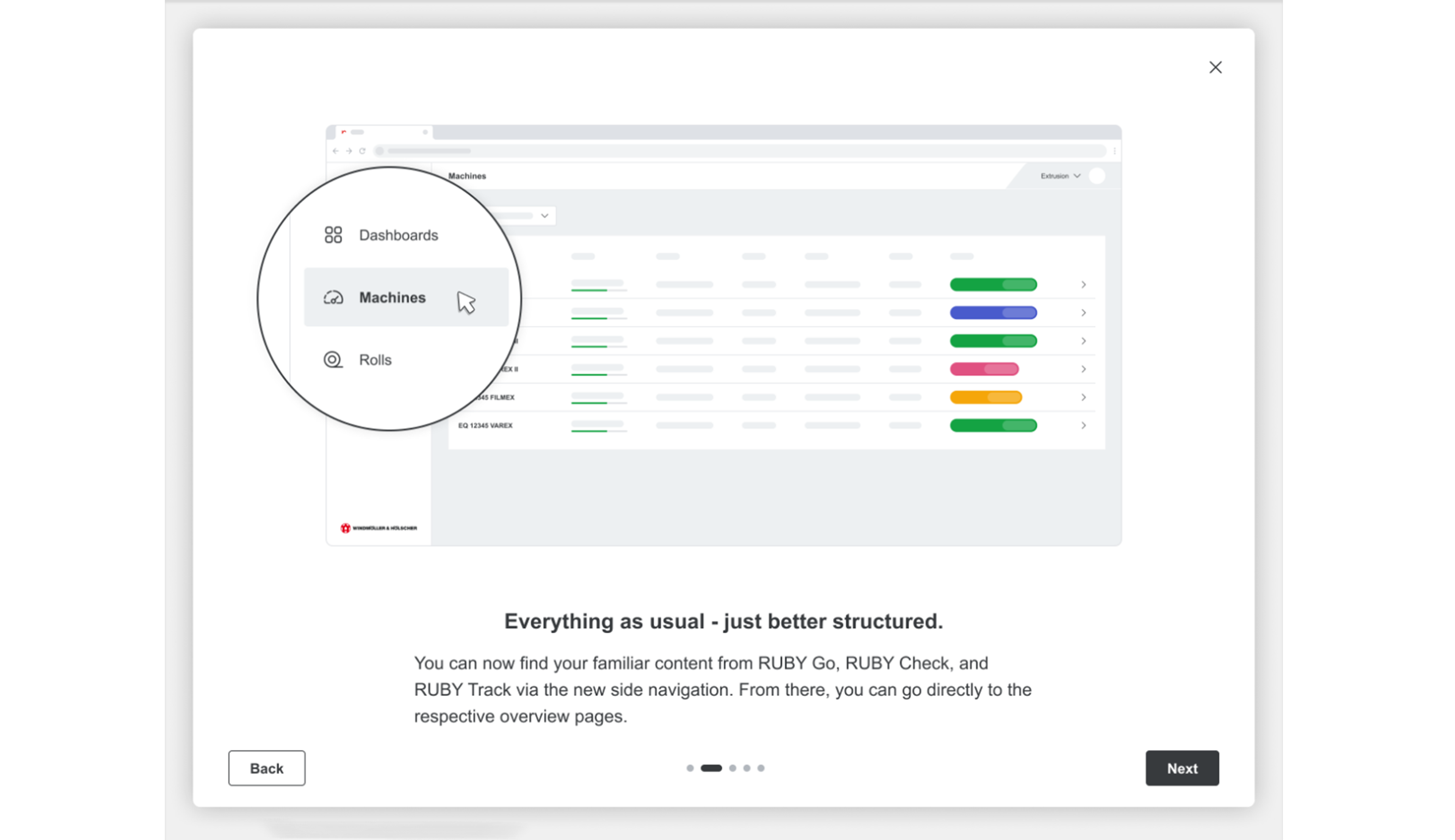
1.1 Onboarding RUBY 2.0

1.2 Onboarding RUBY 2.0
1.3 Onboarding RUBY 2.0
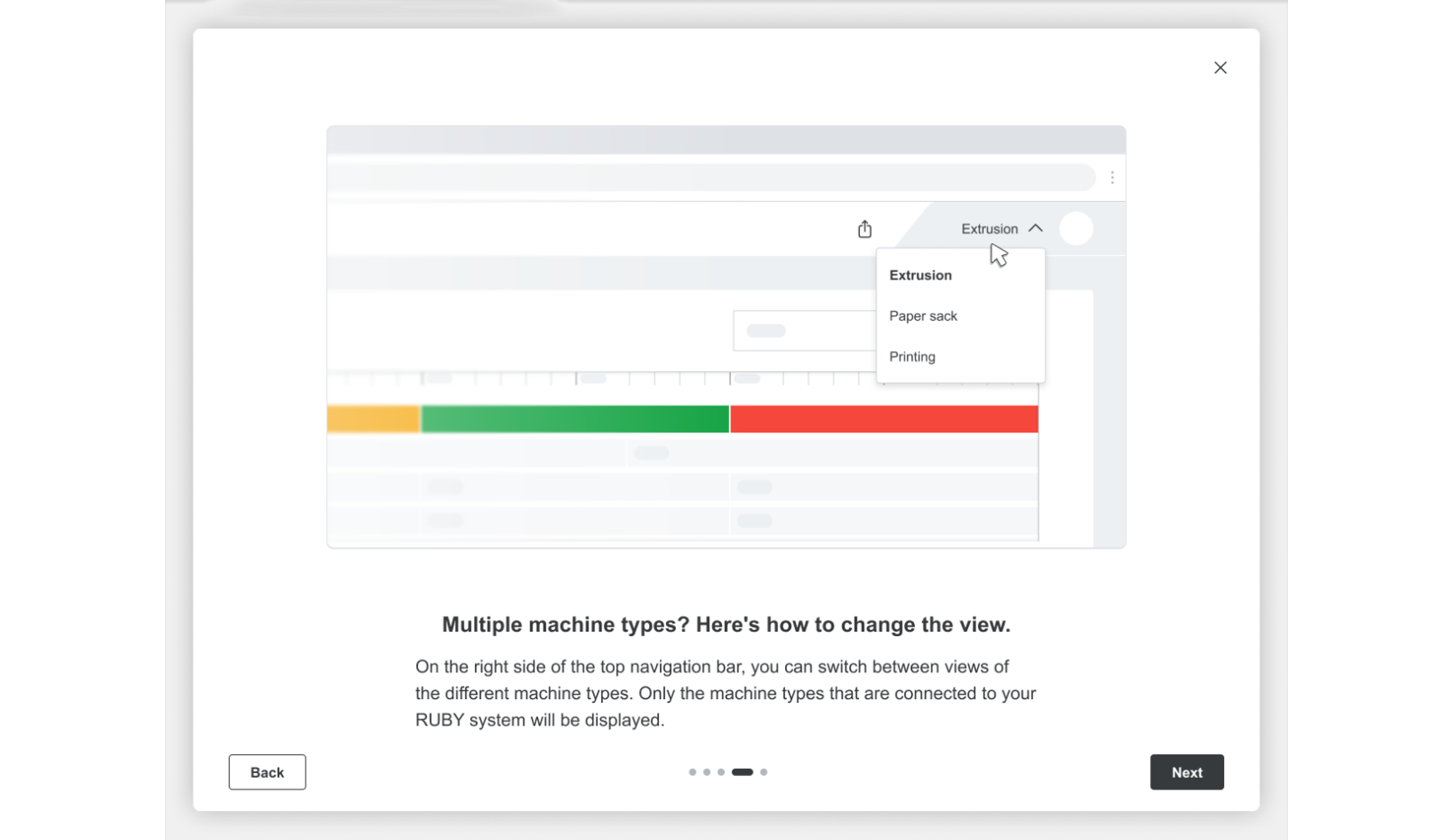
1.4 Onboarding RUBY 2.0
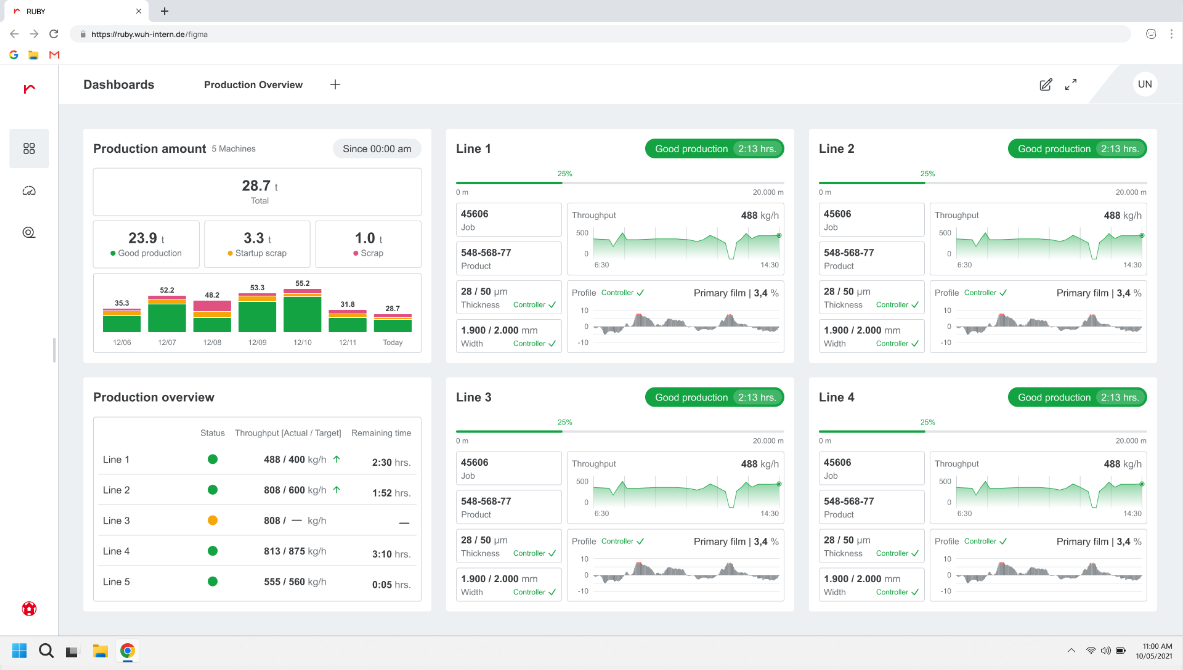
1.5 Onboarding RUBY 2.0

V2.0 - ESSENTIALS

V2.0 (April 2026)

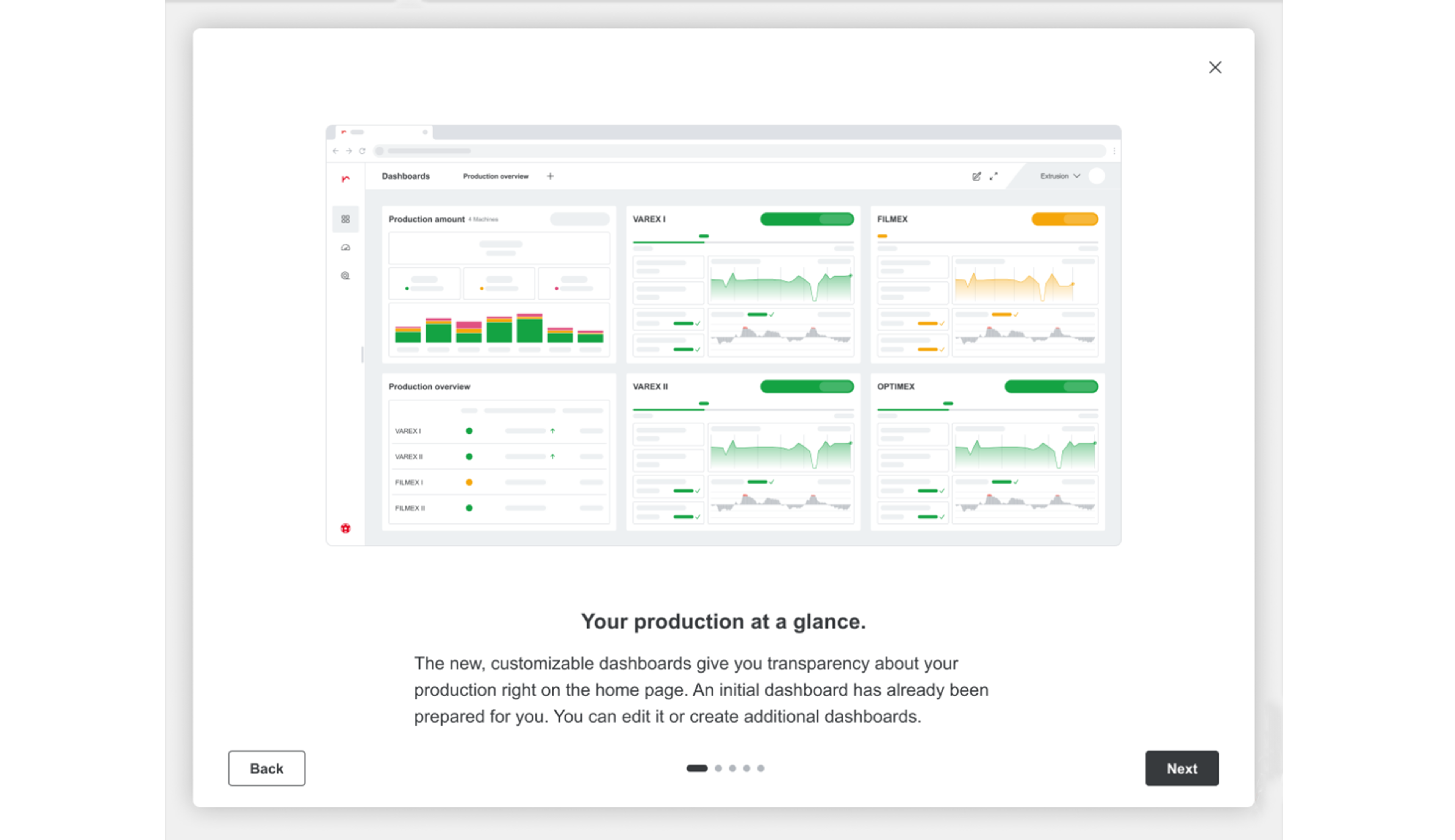
RUBY V2.0 introduces the new dashboards. It´s a modern workspace designed to provide a clear, centralized view of your production performance.

With ready-to-use widgets you can quickly build dashboards and monitor key KPIs across all three Machine types: Extrusion, Printing and Paper sack.
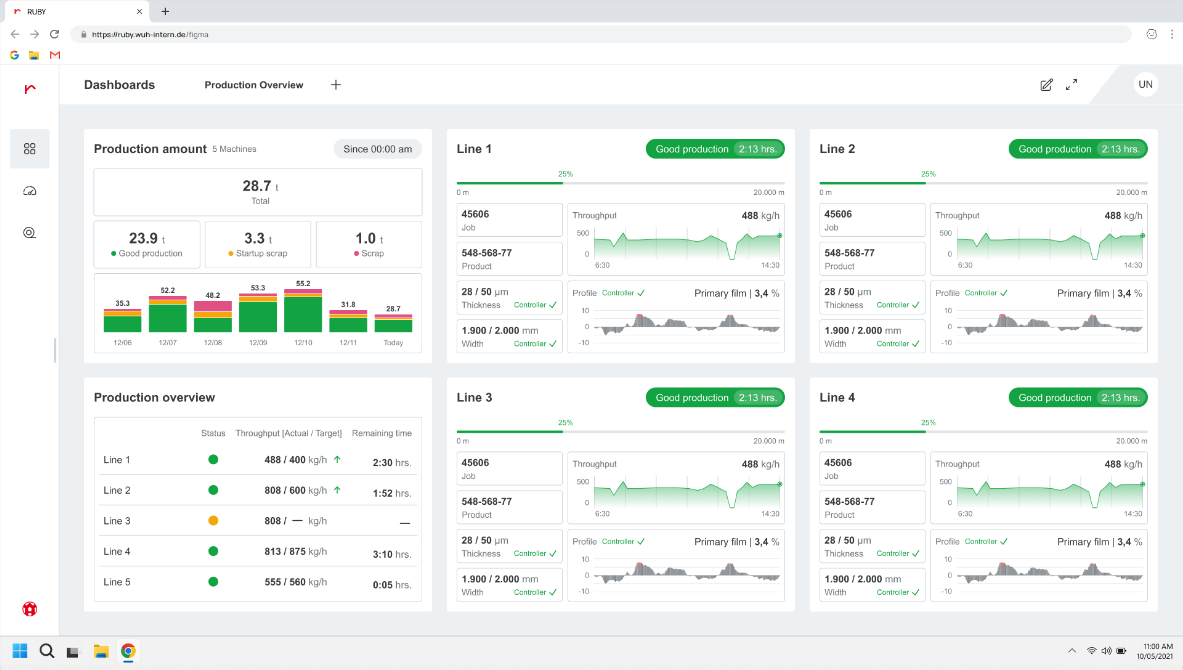
(1/5) New feature

Dashboard

Your advantages

  • Gain a clear, focused view of production performance that enables faster monitoring, smarter decisions, and more efficient daily operations.
  • Create dedicated dashboards for Extrusion, Printing, and Paper sack to match the way each business unit works.
  • Easily build your dashboard by adding, removing, or arranging widgets to highlight the information that matters most.
  • Assign and update machines within widgets at any time to keep your dashboard aligned with current production priorities.


Dashboard

(2/5) New feature

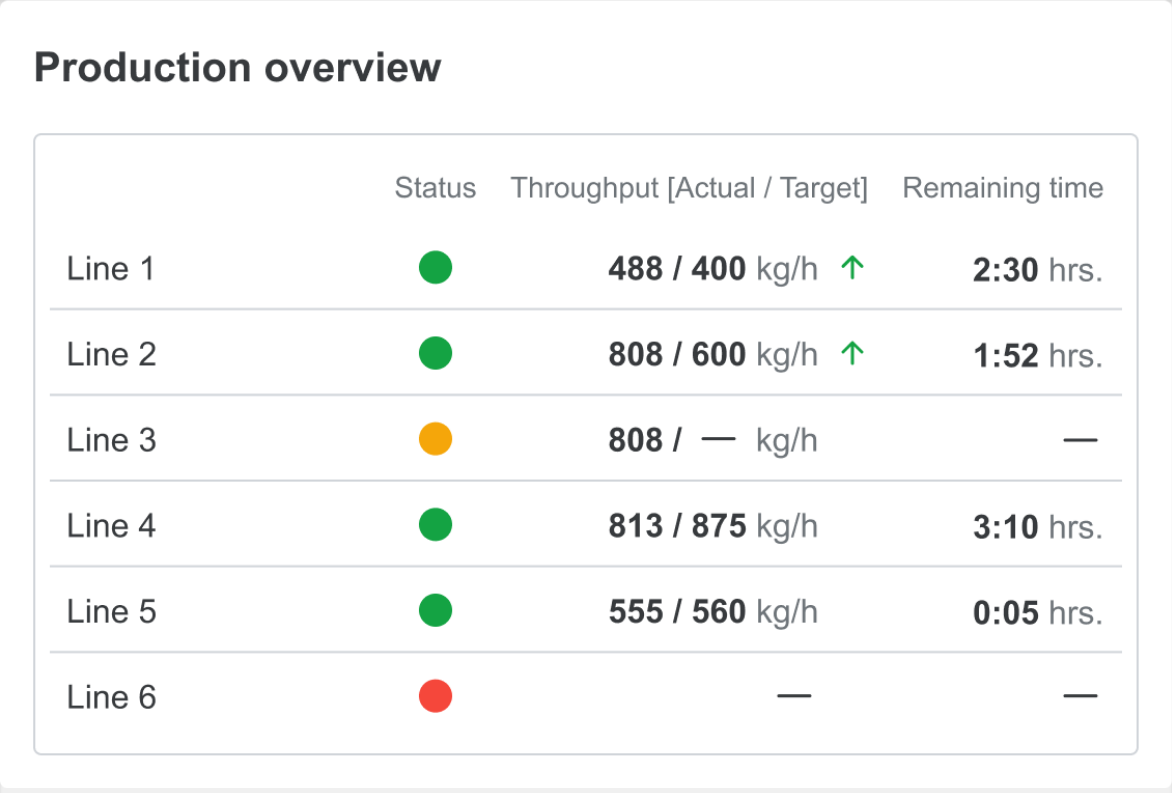
Dashboard: Production overview widget

Your advantages

  • Get a clear, centralized overview of production performance across multiple machines in one place.
  • Monitor production amount, throughput, and machine status to quickly understand overall shopfloor performance.
  • Enables faster daily decisions by highlighting key KPIs at a glance.

Production overview widget - Extrusion
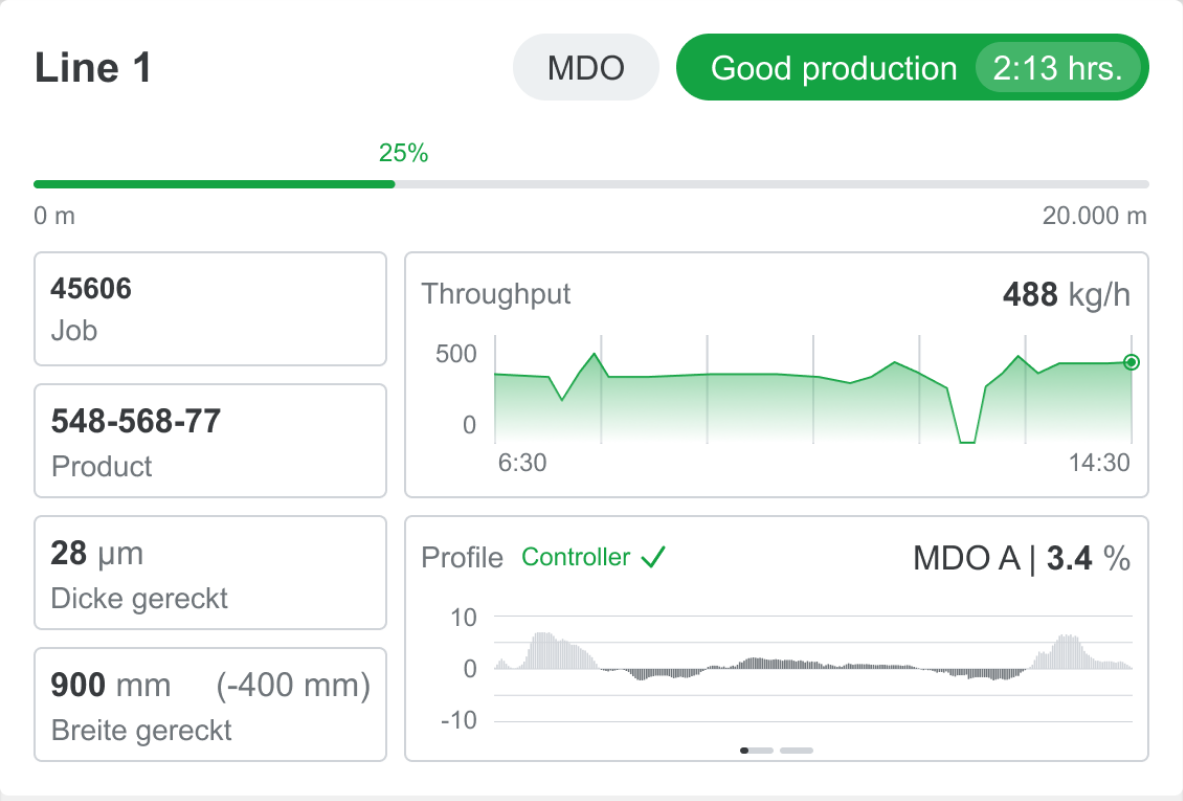
(3/5) New feature

Dashboard: Single machine summary widget

Your advantages

  • Monitor live production status, performance trends, and key machine parameters in one consistent view across Extrusion, Printing and Paper sack.
  • Gain instant transparency into running jobs, throughput or speed, and remaining production time for faster operational decisions.
  • Supports quick identification of deviations and helps operators maintain stable and efficient production across all departments.

Single summary widget - Extrusion

(4/5) New feature

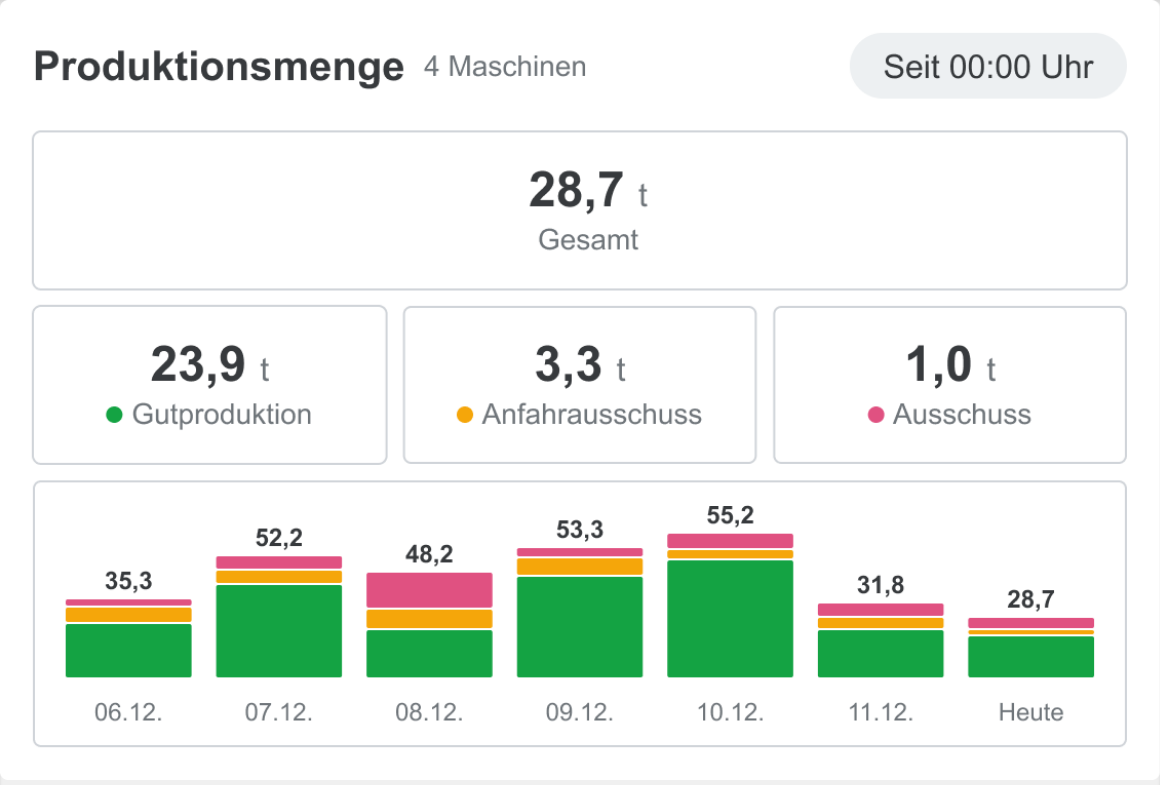
Dashboard: Production amount widget

Your advantages

  • Get an instant overview of total production output, good production, startup scrap and scrap in one clear view.
  • Compare daily production performance through a visual trend chart to identify patterns and deviations faster.
  • Supports quick performance evaluation and helps teams make data-driven production decisions.


Production amount widget - Extrusion

(5/5) New feature

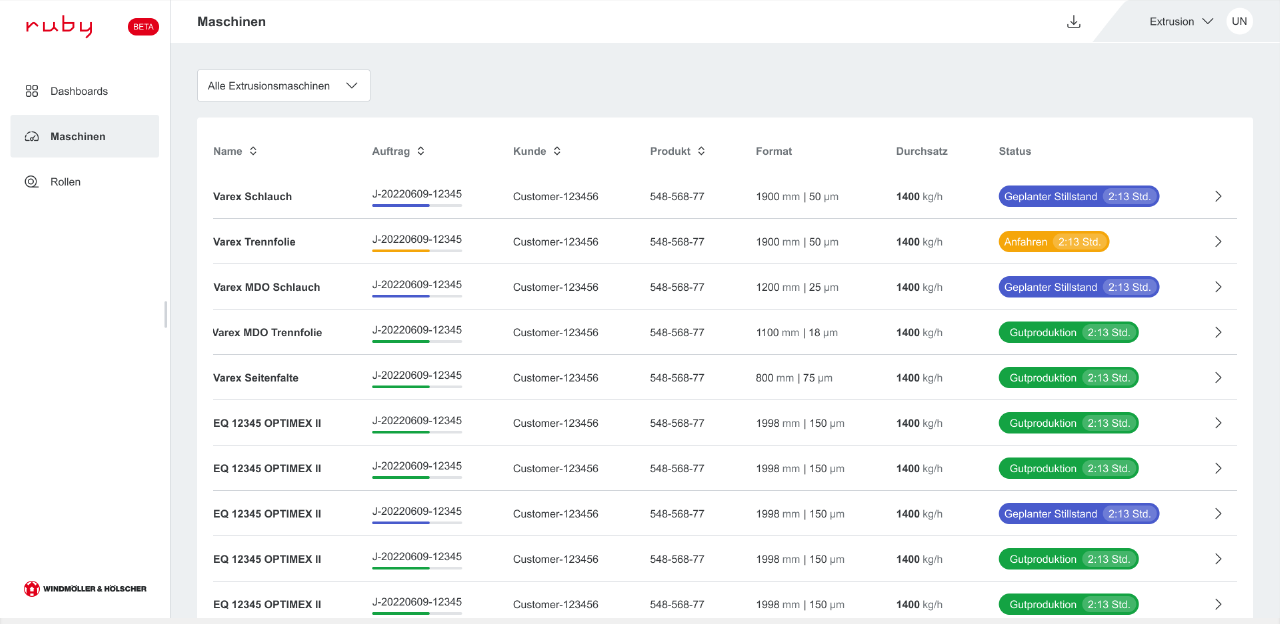
Machines overview page

Your advantages

  • Better scalability for large machine fleets
  • Faster scanning and comparison of machines
  • Improved readability of status, throughput and production data
  • More structured navigation for daily operation monitoring

New machine overview page - Extrusion

V2.0 - RUBY Go

V2.0 (April 2026)

RUBY V2.0 introduces a redesigned frontend for improved usability and a more intuitive production experience.

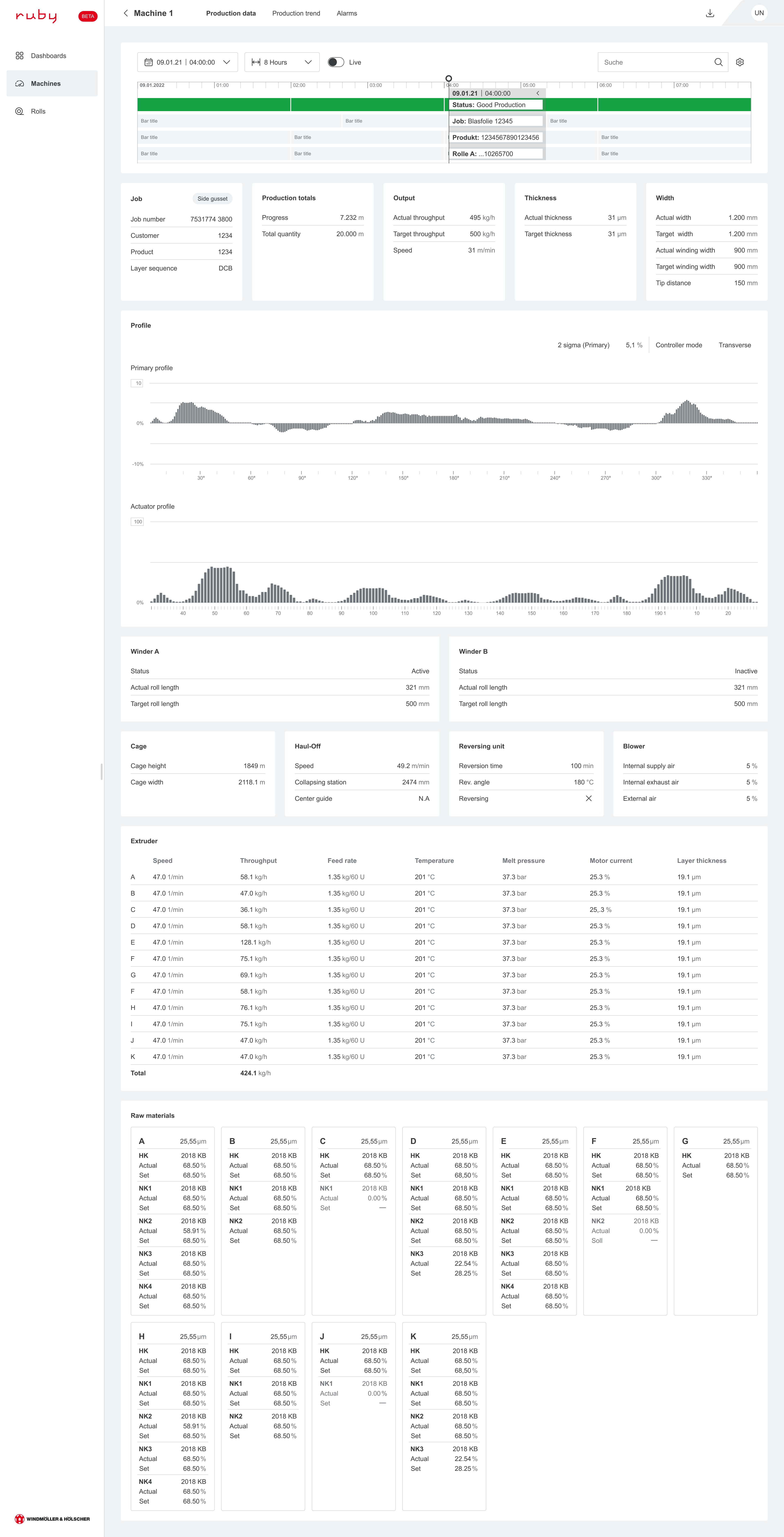
Enhanced production data pages for Printing and Paper sack deliver clearer, more structured insights into machine performance and process parameters. Advanced MDO & Side Gusset visualization enables better understanding of process behavior, supporting faster and more informed decisions.
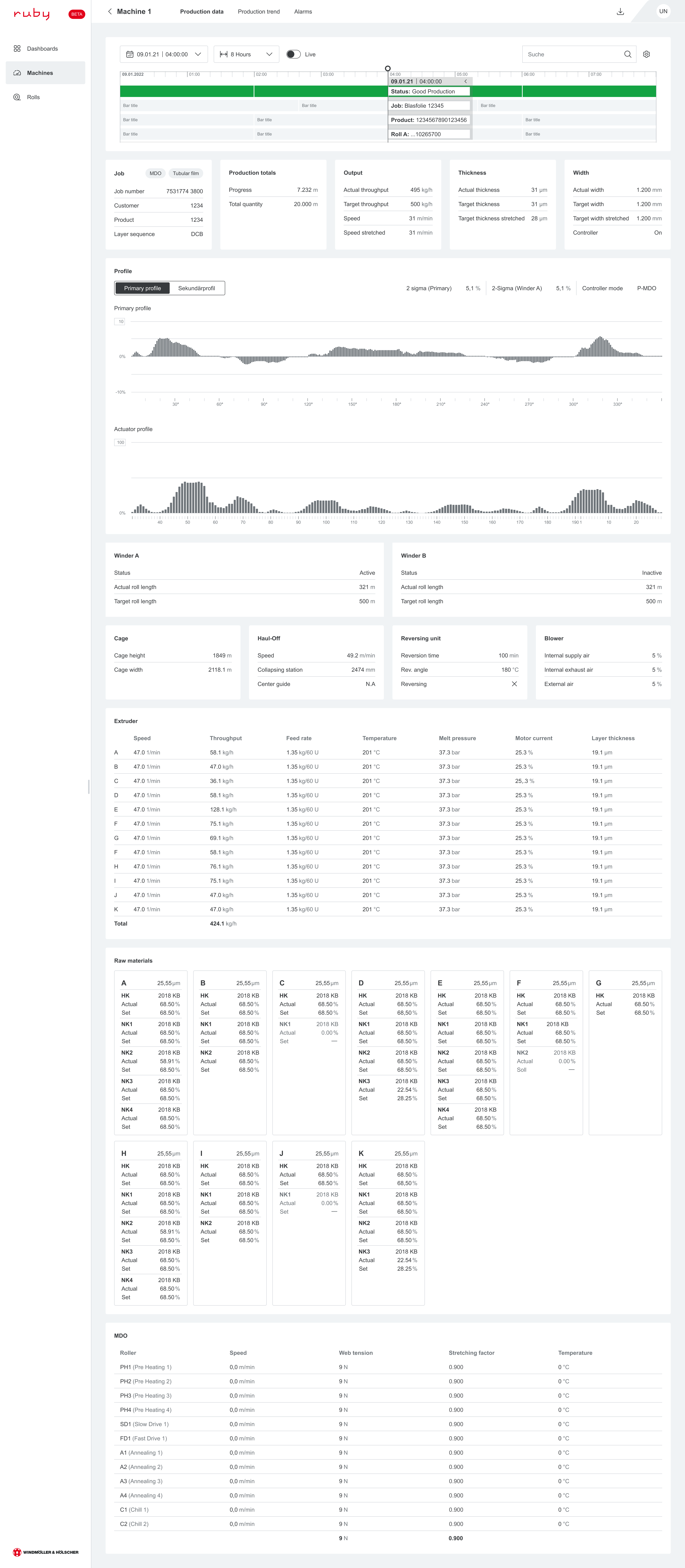
(1/4) New feature

Extrusion: Production data page (MDO & Side Gusset)

Your advantages

  • Improved visualization of MDO profile and Side Gusset process behavior.
  • Clear overview of production totals, output, thickness, width and process parameters.
  • Faster identification of deviations through structured and consistent data presentation.
  • Better decision support for operators and process engineers to maintain stable production.


Production data page Extrusion: MDO

Production data Page Extrusion: Side Gusset
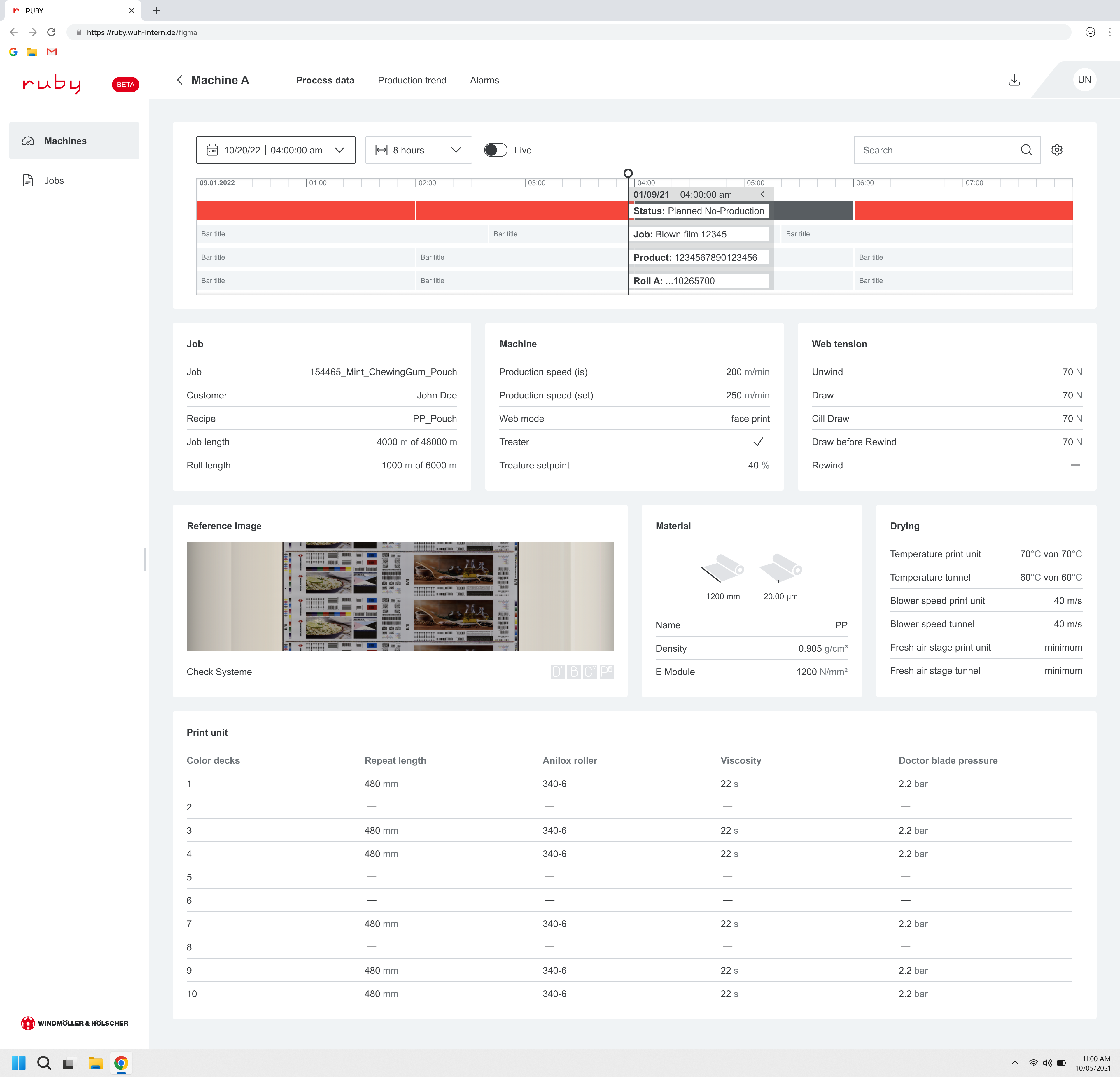
(2/4) New feature

Printing: Production data page

Your advantages

  • More intuitive and streamlined layout, separating key variables and values for faster readability and reduced operator effort.
  • Integrated reference image display, allowing operators to visually compare print output directly within the production view.
  • Expanded and better-structured process data overview, providing more detailed insights into machine parameters and production settings.


Production data page: Printing

(3/4) New feature

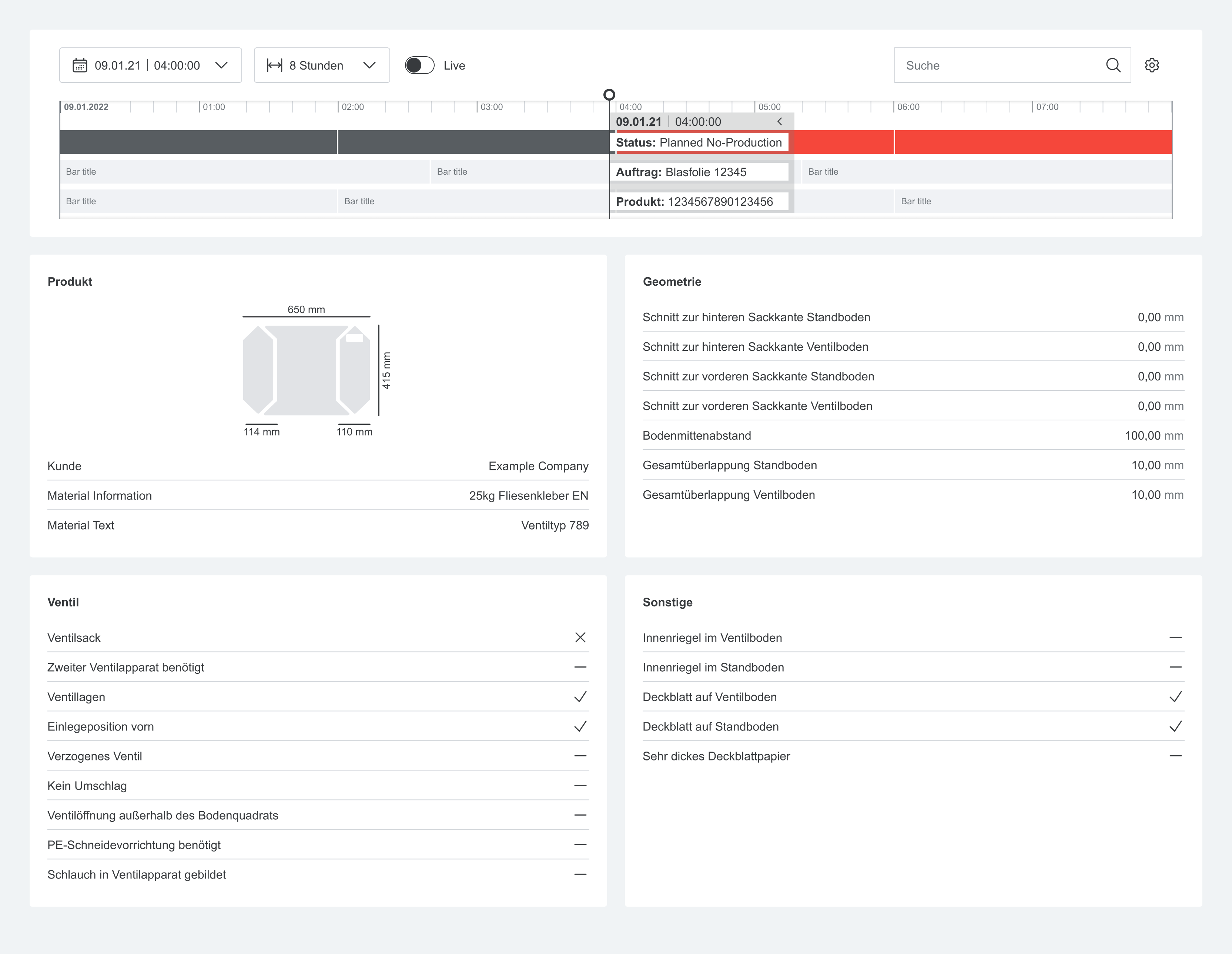
Papersack: Production data page

Your advantages

  • Improved timeline visualization with clear production status tracking, enabling quick understanding of machine states and job progression.
  • Simplified and more structured layout, presenting all sack-related parameters in a single, easy-to-scan list for faster access.
  • Enhanced focus on key production parameters, supporting better monitoring and consistency of papersack specifications during production.


Production data page: Paper sack

(4/4) New feature

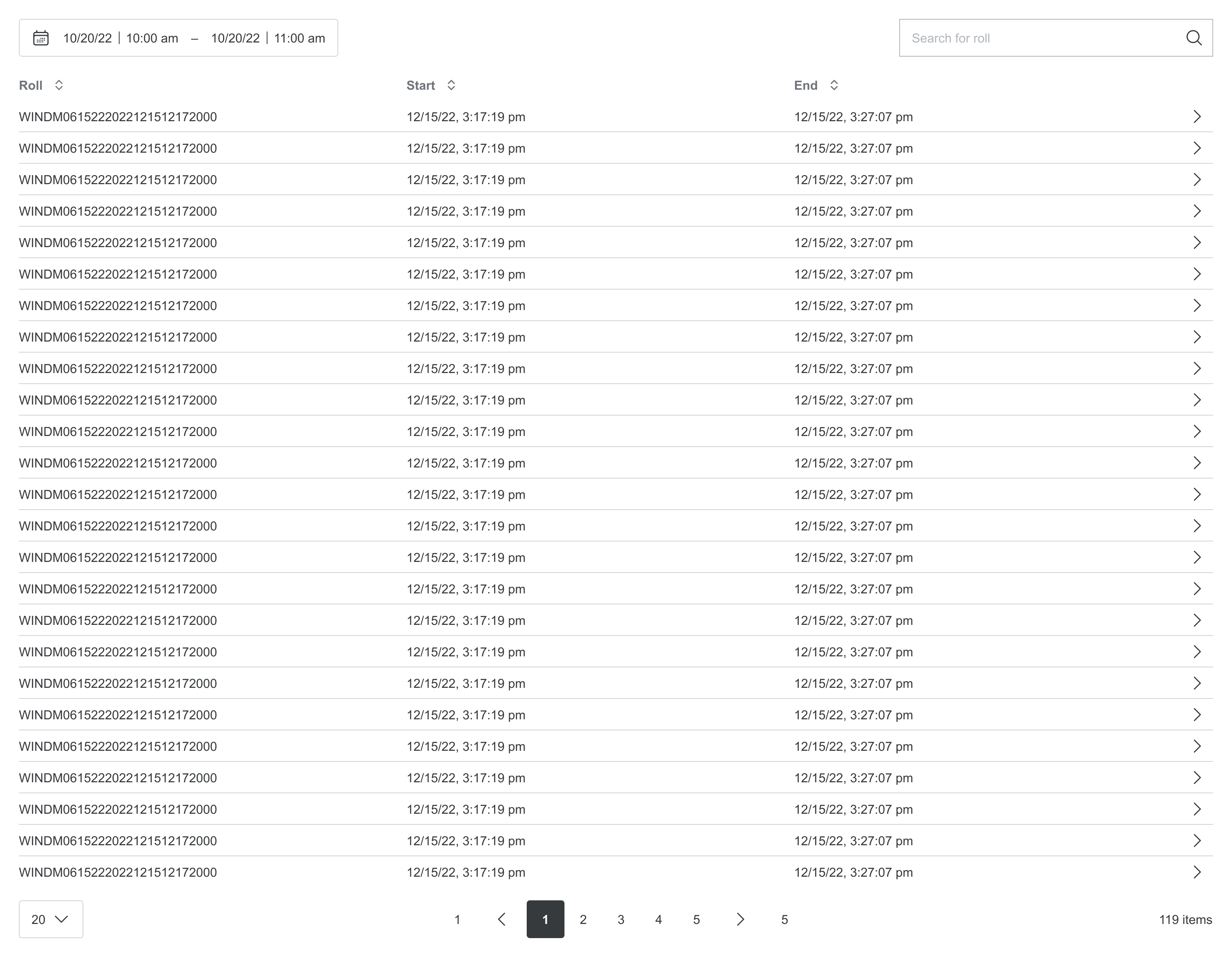
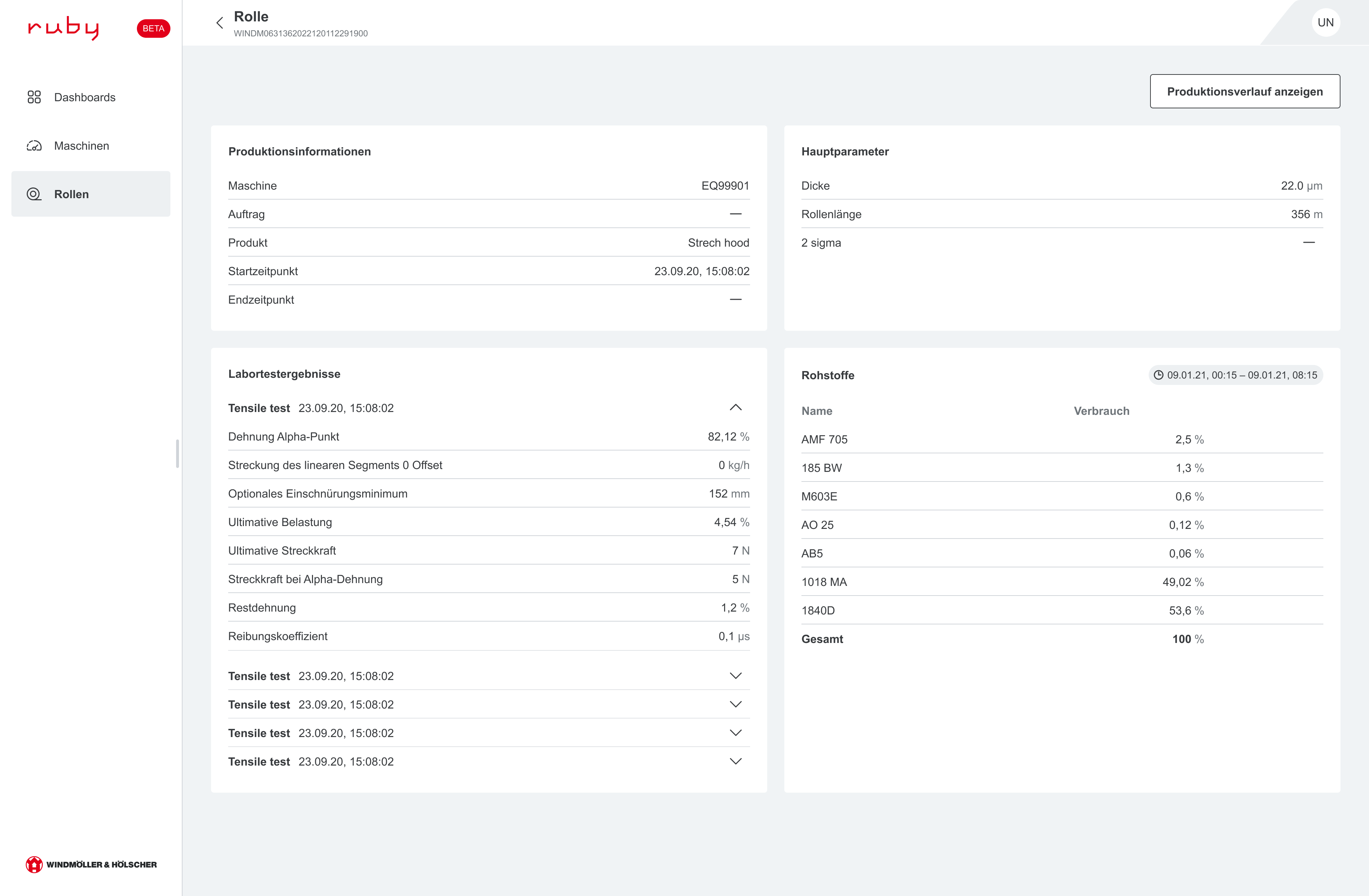
Extrusion: Roll overview & details

Your advantages

  • Full transparency of production data for every individual roll.
  • Quickly search, filter, and navigate through roll history.
  • Access detailed roll information including production data, main parameters and material usage.
  • Improved traceability to support quality analysis and process optimization.

Rolls overview page

Rolls details page

V2.0 - RUBY Track

V2.0 (April 2026)

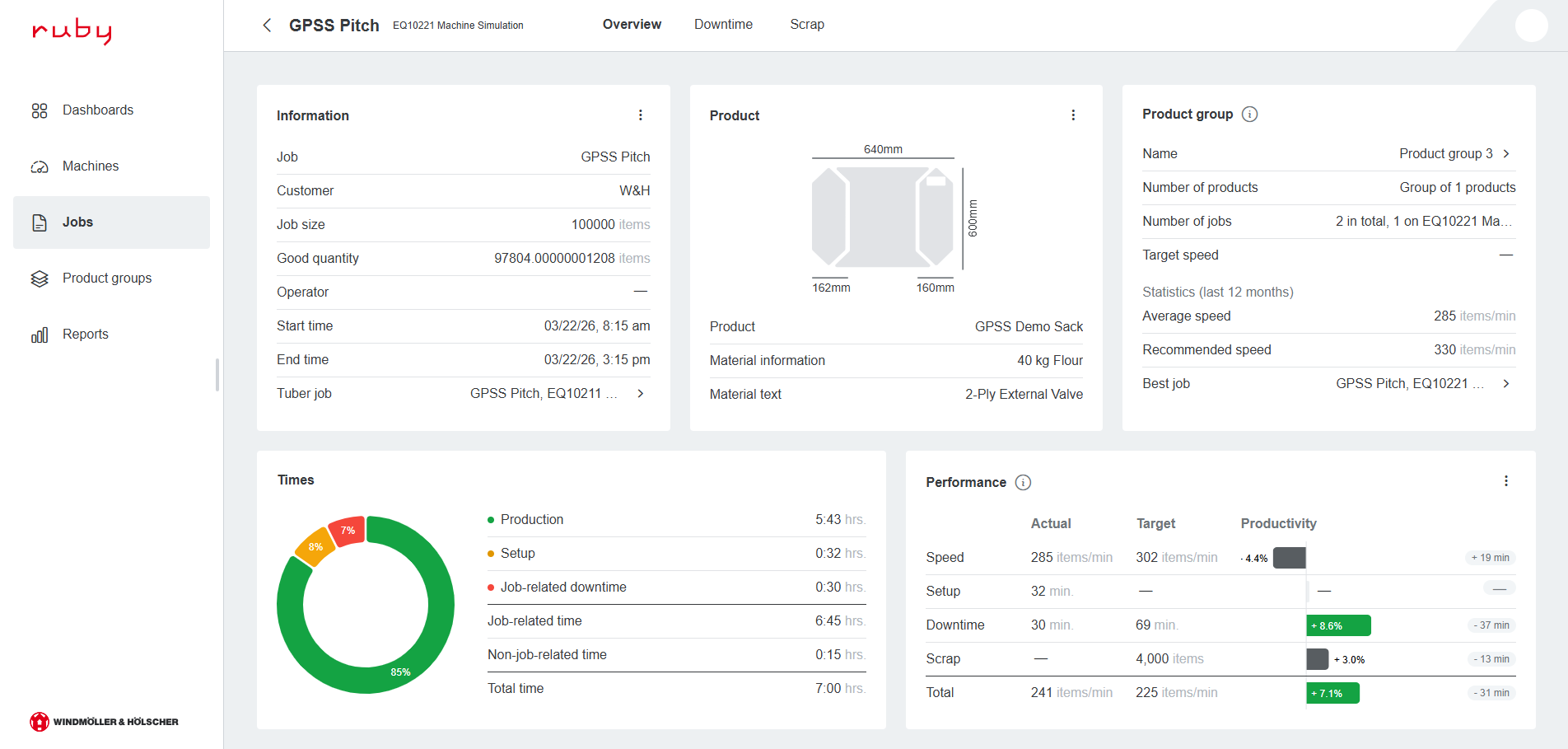
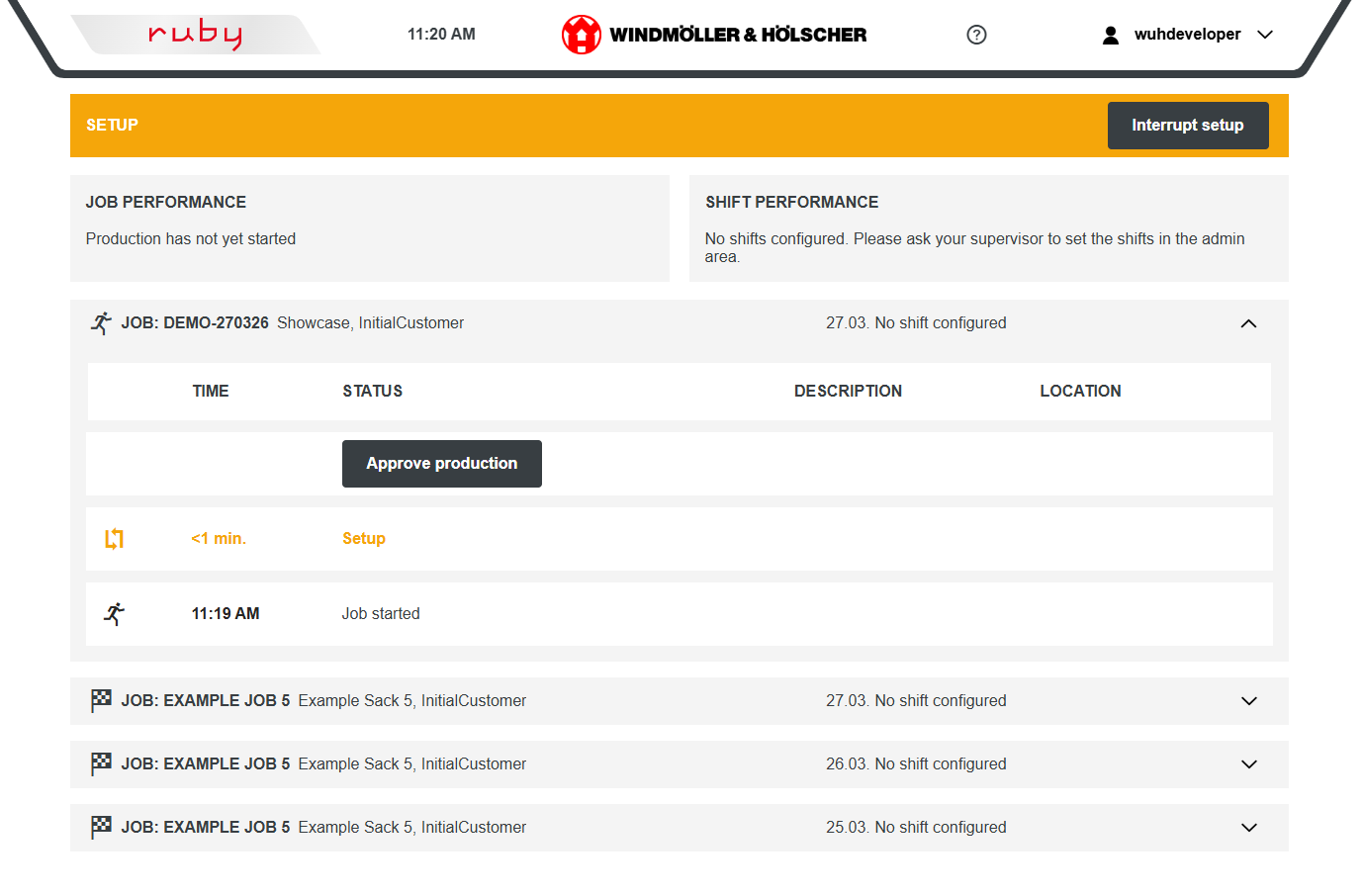
RUBY Track 2.0 is now production ready, offering a new job page with comparable KPIs, improved job history and speed recommendations based on historic data. Enhanced downtime reasons and locations enable more precise analysis, while the new interrupt setup feature lets users document setup interruptions as downtime and avoid knowledge loss during shift changes.
(1/3) New feature

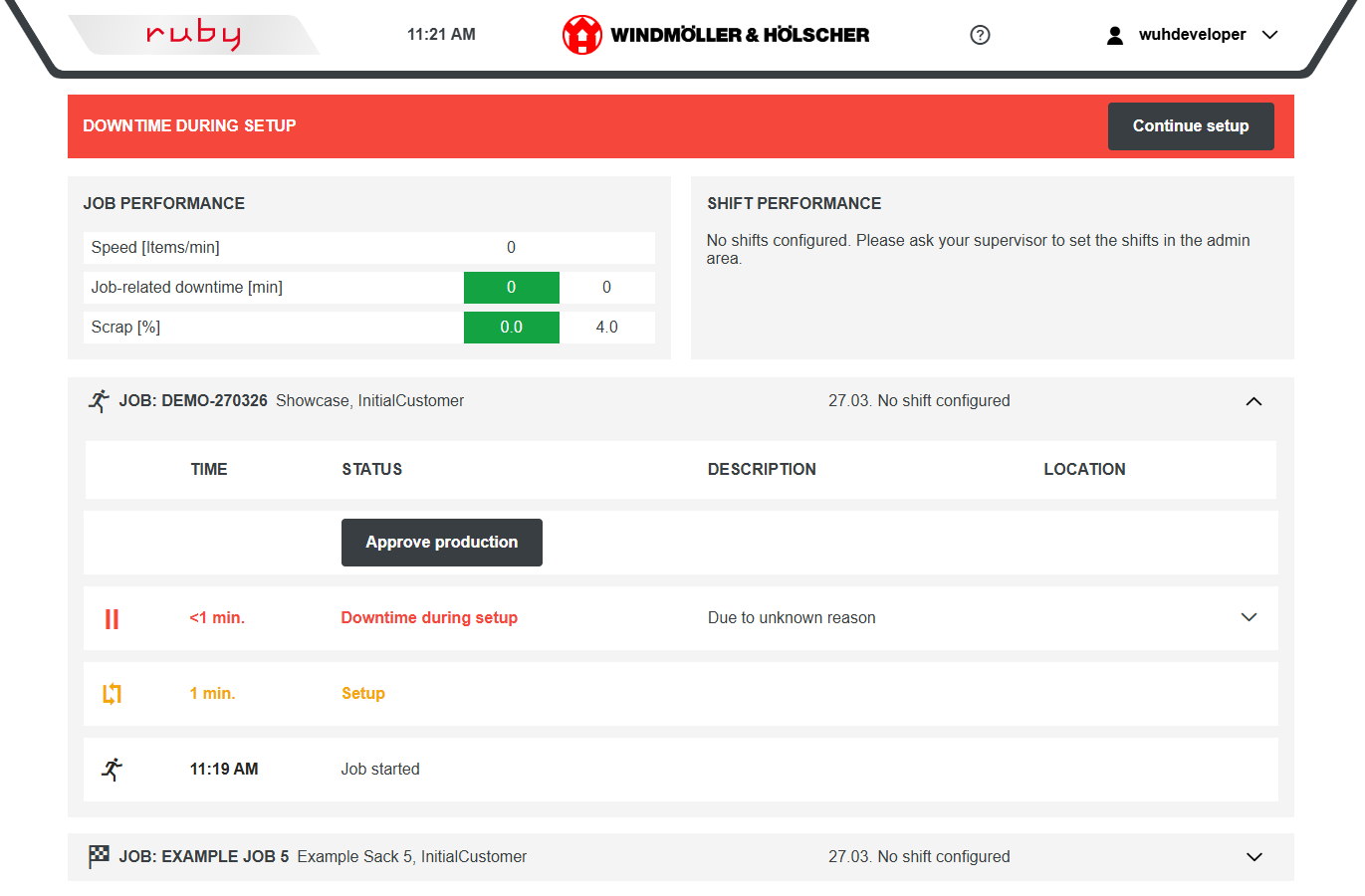
RUBY Track 2.0 is now production ready

Your advantages

  • Comparable KPIs on new job page
  • Improved job history
  • Joint analysis of similar jobs with product groups
  • Speed recommendation based on historic data

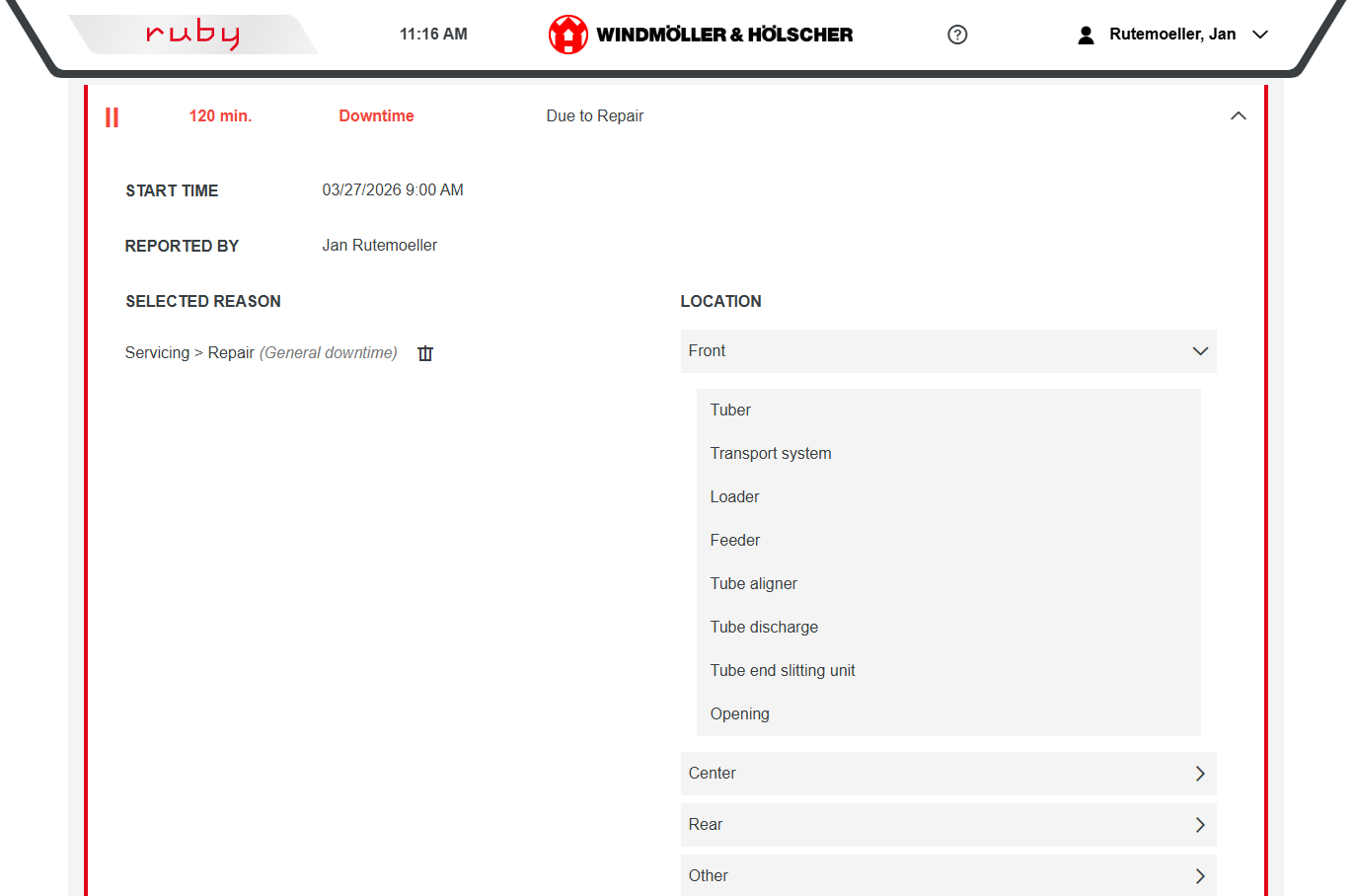
(2/3) New feature

Improved downtime reasons and locations

Your advantages

  • Improved downtime analysis by more detailed downtime locations
  • Differentiate between job-related and general cleaning and waiting

(3/3) New feature

Interrupt setup

Your advantages

  • Split and document setup interruptions (like waiting for tubes or repair) directly as downtime.
  • Preventing knowledge loss during shift changes.
ARCHIVE

V1.17 (SEPTEMBER 2025)

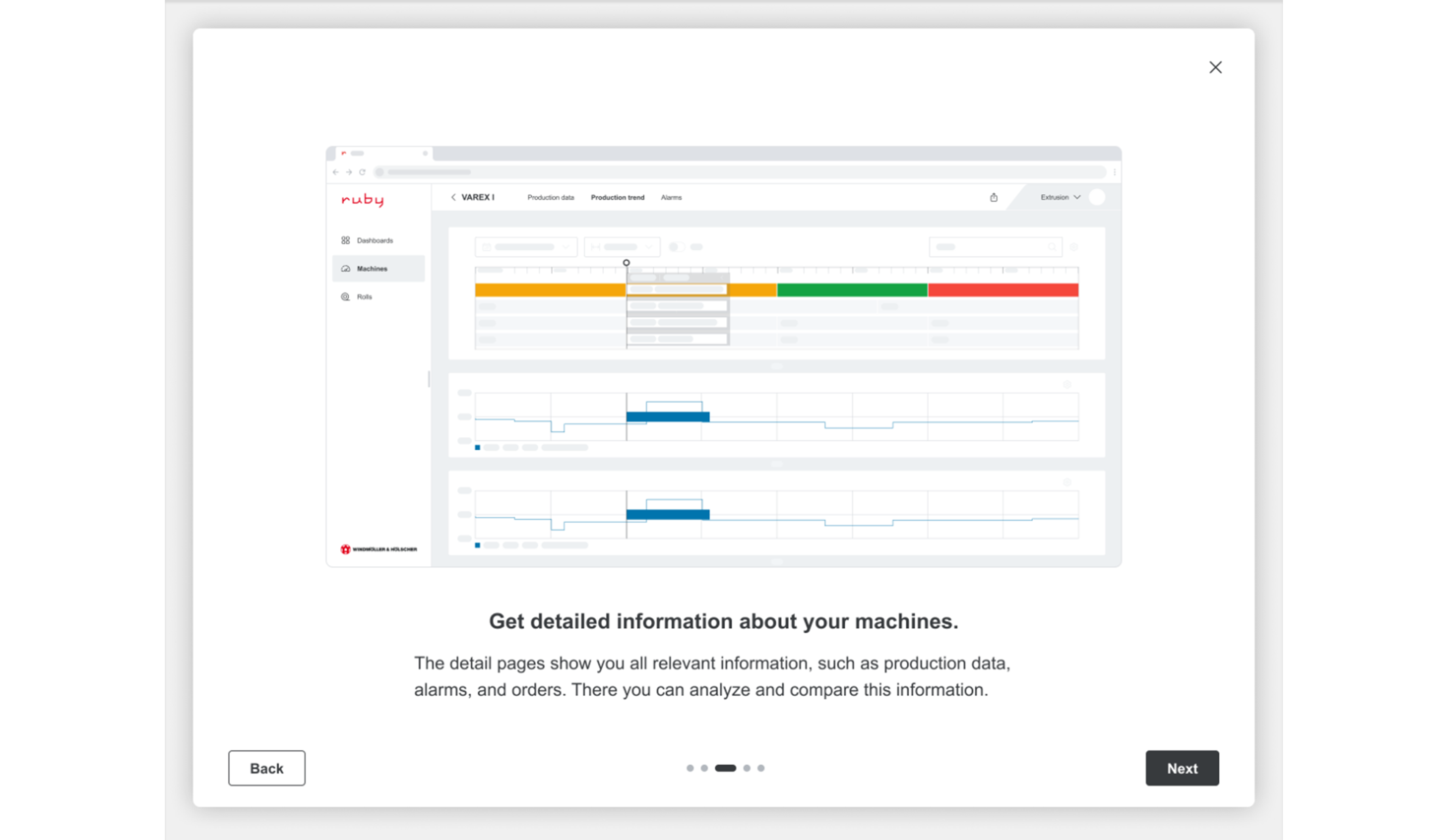
With version 1.17 RUBY users will receive additional pages within the machine cards in the new frontend: Trending, Production Data and Alarms offer deeper insights at a glance.

Additionally, 1.17 includes a completely revamped TRACK module, along with several new features in CHECK - designed to make workflows even more efficient.

NEW FEATURES

  • RUBY 2.0: Dive into the beta version of the new frontend – now with expanded machine overview and more intuitive navigation across multiple pages
  • RUBY Go: Enhanced Profile Thickness Chart with MDO & Tolerance in Trending
    RUBY Go: All-new Production Data Page – tailored for extrusion and printing workflows
  • RUBY Check: Enhanced defect visualization for faster and more reliable quality decisions
  • RUBY Track: A completely redesigned TRACK experience – optimized for real-time tracking, diagnostics and performance analytics.

SELECTED BUGFIXES

  • RUBY Go: PDF report is now more accurate
  • RUBY Track: Product list not working
  • RUBY Track: Product target speed not working

V1.16 (FEBRUARY 2025)

With version 1.16, RUBY users will gain significant advantages from machine snapshot data, enhancing Quick Rollback & System Stability, Disaster Recovery, Safe Software Updates, and Security & Compliance.

Additionally, 1.16 includes essential updates and fixes for RUBY 2.0, RUBY Go, Track, and the Public API.

SELECTED BUGFIXES

  • RUBY: Wrong scrap counts
  • RUBY 2.0: 8 hour speed trend was not updated on historic snapshot changes
  • Trending: Counter data like roll length or material consumption are now shown correctly in the trending
  • RUBY Track: Splitting job into new job also updates old job
  • RUBY Track: Show maximum 50 alarms on downtimes
  • RUBY Track: Persist admin settings on each job
  • Public API / Connect 4 Flow: Wrong return codes when machine has no license
  • Public API / Connect 4 Flow: Department filter not implemented on count production requests endpoint

V1.15 (SEPTEMBER 2024)

With version 1.15 RUBY will link the glimpse of the new fronted (Beta Version) with completely new machine overview page.

We also have new features in Track, Check and Connect 4 Flow.

NEW FEATURES

  • RUBY 2.0: Beta version of New frontend (Machine Overview)
  • RUBY linked to RUBY 2.0 (New Frontend)
  • RUBY Go: Extended PDF Report for extrusion machines with MDO data
  • Data Archiving: User is informed about the option to activate data archiving
  • Public API: Material consumption for blown film lines available
  • RUBY Check: Visualization of DEFECT-CHECK training intervals to the activity bar
  • RUBY Track: Enhanced possibilities to correct recorded data

SELECTED BUGFIXES

  • RUBY Go: Missing values in the extrusion Production printout
  • RUBY Track: Wrong data on downtime page, when shift borders were queried
  • RUBY Track: Configured scheduled non-production routine did not work, when machine was offline.
  • RUBY Track: Timeouts on approve production
  • RUBY Track: Wrong scrap counts
  • RUBY Check: Fixed disappearing diamond icon while switching to different languages
  • Connect 4 Flow: Catch with machine setting now possible

V1.14 (JULY 2023)

With version 1.14 RUBY Check supports RGB-LAB-CHECK. You can analyze all inspection results from RGB-LAB-CHECK, our inline color measurement based on RGB data.

We also introduce the new features of Data Archiving and Connect 4 Flow

NEW FEATURES

  • RUBY Data Archive
  • RUBY Check: Visualization of RGB-LAB-CHECK Data
  • Connect 4 Flow

SELECTED BUGFIXES

  • RUBY Go & Gain: Limit data loading timespan when job with reused job id is selected in TimeNav
  • RUBY Go: Show density of resins with three decimal places on process data page
  • RUBY Gain: Fixed out of memory problem when dealing with extruded rolls
  • RUBY Track: Record production breaks like weekends via button press
  • Platform: User management updated

V1.13 (JANUARY 2023)

With version 1.13 RUBY Go and RUBY Gain support new parameter types in trending.

In RUBY Gain product recognition settings can now be modified after completion of the setup process and new products or new geometries get parameter limits more easily.

NEW FEATURES

  • RUBY Go & Gain:
    String and boolean type parameters can be shown in trending
  • RUBY Gain:
    Product recognition settings like replacement resins can be modified after setup process has been completed
  • RUBY Gain:
    New products or new geometries of known products get parameter limits more easily

SELECTED BUGFIXES

  • RUBY Go & Gain:
    Values on flag not shown in scientific notation any more
  • RUBY Go & Gain:
    Returning to live mode has been fixed

V1.12 (SEPTEMBER 2022)

Version 1.12 contains a whole new feature: The RUBY App.

It also contains improvements for the time navigation in RUBY Go and RUBY Gain, new filtering options for RUBY Check and some bug fixes.

NEW FEATURES

  • RUBY App:
    Keep an eye on your production. No matter where you are.

    iOS: Click here

    Android: Click here
  • RUBY Go & Gain:
    Time selection has new interaction and navigation options
  • RUBY Check:
    New filtering function that displays print defects according to their defect classification
  • RUBY Check:
    New enlarged view of the defects

SELECTED BUGFIXES

  • RUBY Gain:
    Trends do not overlap time selection element any more when scrolling
  • RUBY Go & Gain:
    Time selection updates to current time when page remains opened
  • RUBY Go & Gain:
    More data can be seen on one screen, because legend in trending uses less space

V1.11 (MAY 2022)

Version 1.11 contains new features for RUBY Go and some bug fixes.
More detailed information about the features can be found on the respective pages of the extensions above.

NEW FEATURES

  • RUBY Go:
    Export process data into a CSV
  • RUBY Go:
    Generate production printouts with main data
    for extrusion lines as a downloadable PDF
  • RUBY Go:
    Easy to use time selection mechanism

SELECTED BUGFIXES

  • RUBY Go & Gain:
    Live mode is activated again when returning to page
  • RUBY Gain:
    Support for United States Customary Units (Non-SI)
  • RUBY Go:
    Units and localization added on process data page for printing presses and paper sack lines

V1.10 (NOVEMBER 2021)

Version 1.10 contained new features (for RUBY Check and RUBY Gain) and some bug fixes.

RUBY Gain

New Features

(1/3) New product recognition based on film structure


(2/3) New guided setup process


(3/3) New management of parameter limits

Your advantages

  • Products are no longer recognized based on individual recipe names alone, but based on the material mix.
  • Similar products are clustered.

  • For optimal use, you will be guided through the
    necessary settings at the beginning (e.g. configuration
    of product recognition, setting of parameter limits).

  • The parameter limits (e.g. temperature in the extruder)
    can be calculated and overwritten in a more
    structured and clear manner.

Overview of the new RUBY Gain features
RUBY Check

New Features

(1/1) Export the visualized results into a downloadable PDF. The level of detail can be adjusted individually.

Your advantages

  • The shown job/roll can be exported as a PDF to create a comprehensive report.
  • The PDF can be used for internal and external exchange without access to RUBY or for paper-based workflows.
  • In addition to storage on local drives, the PDF can be used for import into other quality management systems.